I Spent an Hour Proving the TLS Was Fine
KOReader could reach my self-hosted bookmark service from a laptop, but on a jailbroken Kindle the same URL died before returning even a 404 or 500. The KOReader Tailscale proxy problem looked like TLS. One DNS lookup showed that the Kindle had no route to the server.
ERROR [HttpClient] Network error: GET https://[service-hostname]/api/v1/lists
WARN  [BaseView] API call failed: Network error occurred
I spent an hour blaming encryption because the request failed before the server sent a web response. The useful lesson is about order: debug DNS, routing, TCP, TLS, and HTTP in that sequence. Evidence gathered above the broken layer can be precise and still irrelevant.
TL;DR
TLS was not the cause. DNS resolved the service to a private Tailscale address that my laptop could reach but the Kindle could not. Tailscale was running in userspace mode, so KOReader had to use its local HTTP proxy. LuaSocket and LuaSec lacked HTTPS proxy support, so I added a CONNECT tunnel and then started TLS inside it.
Why TLS looked guilty
TLS is the security conversation that happens before an HTTPS request. The client and server agree on encryption and the server proves its identity with certificates. If that conversation fails, the application never receives an HTTP status.
A 2018 e-reader has older networking software. Modern servers may require newer TLS versions, encryption choices, or certificate authorities. “Old client, modern server, no response” was therefore a reasonable theory.
It was also wrong. I should have checked the destination address and route first because those tests are cheaper and sit below TLS in the connection.
Check the TLS stack without overclaiming
The checks were still useful. Each answered one specific question.
Confirm HTTPS support in the client
KOReader plugins use LuaSocket. On its own, LuaSocket handles ordinary HTTP but not encrypted HTTPS. The version on the Kindle also shipped LuaSec, which adds TLS support:
local SCHEMES = {
    http = { port = 80, ... },
    https = {
        port = 443,
        create = function(t)
            local https = assert(require("ssl.https"), "LuaSocket: LuaSec not found")
            ...
The https entry proved that the client was already wired to LuaSec. Adding
another TLS library would have “fixed” a feature that already existed.
Check the protocol floor
$ openssl s_client -connect host:443 -tls1_2 | grep Protocol
Protocol: TLSv1.2
The server accepted TLS 1.2. That made a minimum-version mismatch less likely. It did not prove that the Kindle and server shared every required encryption option, because the test ran on my laptop.
Inspect the certificate chain
A certificate chain is the set of documents linking a site certificate to an authority the device already trusts. Some browsers quietly fetch a missing link; smaller libraries often fail.
0 s:CN=[service-hostname]
  i:C=US, O=Let's Encrypt, CN=YE2
1 s:C=US, O=Let's Encrypt, CN=YE2
  i:C=US, O=ISRG, CN=Root YE
2 s:C=US, O=ISRG, CN=Root YE
  i:CN=ISRG Root X2
3 s:CN=ISRG Root X2
  i:CN=ISRG Root X1
Verify return code: 0 (ok)
The server sent the observed chain, and OpenSSL on the laptop validated it. The server was not omitting an intermediate certificate in that test.
Read the Kindle trust store
A CA bundle is the device's list of trusted certificate authorities. The Kindle bundle included both Let's Encrypt roots used by this chain:
$ openssl crl2pkcs7 -nocrl -certfile ca-bundle.crt \
    | openssl pkcs7 -print_certs -noout | grep ISRG
subject=CN=ISRG Root X1
subject=CN=ISRG Root X2
This was evidence, not proof of a successful Kindle handshake. I had not yet shown that LuaSec loaded this bundle or could build the same chain.
| Suspect | What the check showed |
|---|---|
| LuaSocket has no TLS support | LuaSec was already connected to its https path |
| Server requires a newer protocol | Laptop negotiated TLS 1.2, so this was less likely |
| Server omitted an intermediate | None was missing in this observation |
| Kindle lacks the root certificate | Expected roots were present, but the handshake was untested |
The important wording is “less likely,” not “impossible.” Two checks eliminated specific problems; two only weakened the broader TLS theory.
Resolve the hostname before debugging TLS
The command I should have run first was:
$ dig +short A [service-hostname]
[Tailscale address]
The real answer sat inside 100.64.0.0/10, the IETF shared-address range that
Tailscale uses for devices in a tailnet. My laptop could reach it because the
laptop was connected to that tailnet. The Kindle resolved the same name
correctly but had no route to the returned address.
No TLS handshake had started. The connection failed while trying to open the underlying socket. The missing HTTP status was a clue; the DNS answer and routing difference supplied the proof.
Note
Resolve the hostname before theorising about encryption. dig takes a second.
I spent an hour examining layers above the broken one.
The deeper mistake was treating “same Wi-Fi” as “same network path.” Both devices were on the local network, but only the laptop had a working path into the private Tailscale network.
Why the KOReader Tailscale proxy failed
Tailscale was installed and authenticated on the Kindle, but it was started in userspace networking mode:
tailscaled --tun=userspace-networking \
           --socks5-server=127.0.0.1:1055 \
           --outbound-http-proxy-listen=127.0.0.1:1056
Normally, a VPN creates a virtual network adapter called a TUN device. The
operating system routes private addresses through it. In userspace mode,
Tailscale handles that traffic inside its own process instead. Ordinary Kindle
applications do not receive a system route to 100.x addresses.
They must connect through one of the local proxies instead. Tailscale's userspace networking documentation describes the same model: no TUN device, with SOCKS5 or HTTP proxy access for applications.
The Kindle start script enforced this mode because kernel TUN support caused watchdog failures on e-readers:
# Use userspace networking because kernel TUN on e-reader devices
# triggers wgengine watchdog timeouts on Reconfig.
TUN_FLAG="--tun=userspace-networking"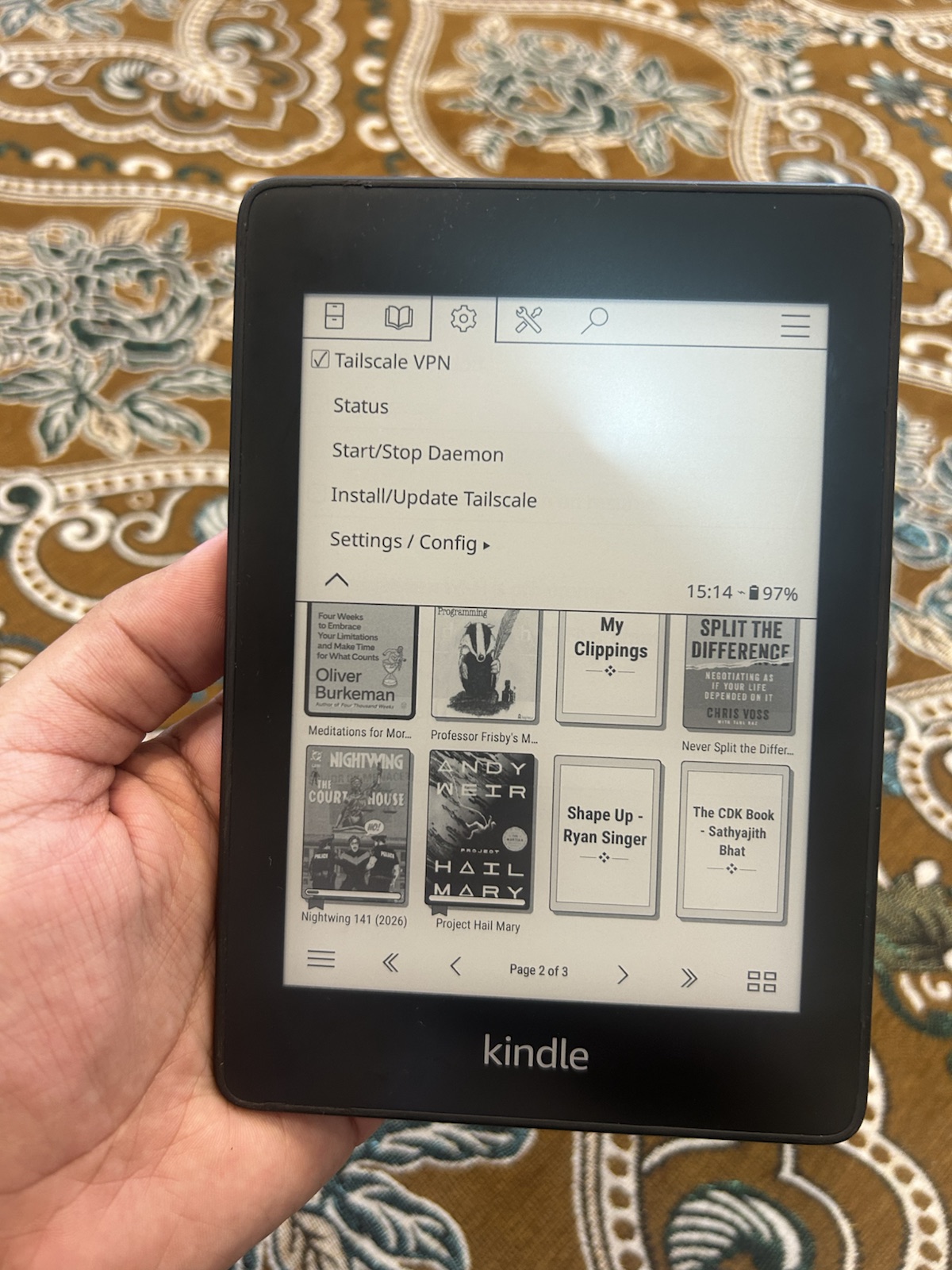
That left one path. KOReader had to send HTTPS traffic through the local HTTP
proxy on 127.0.0.1:1056.
LuaSocket did not implement the HTTP CONNECT method used for encrypted proxy
tunnels. LuaSec was even clearer:
if http.PROXY or url.proxy then
return nil, "proxy not supported"Add HTTP CONNECT tunnelling to LuaSocket
CONNECT is an HTTP proxy instruction that means: “Open a raw tunnel from here
to this host and port.” Once the proxy returns success, the client can perform
the normal TLS handshake through that tunnel.
LuaSocket lets callers provide the function that creates a connection. LuaSec already uses that hook to add TLS, so I extended the same pattern:
function conn:connect(host, port)
    -- 1. Connect to the local Tailscale proxy, not the final server.
    self.sock:settimeout(15)
    try(self.sock:connect(proxy_host, proxy_port))

    -- 2. Ask the proxy to open a tunnel to the final server.
    local req = ("CONNECT %s:%d HTTP/1.1\r\nHost: %s:%d\r\n\r\n")
        :format(host, port, host, port)
    try(self.sock:send(req))

    local status_line = try(self.sock:receive("*l"))
    local code = tonumber(status_line:match("^HTTP/%d%.%d%s+(%d+)") or "")
    if code ~= 200 then
        self.sock:close()
        return nil, "proxy refused CONNECT: " .. tostring(status_line)
    end

    local header_count = 0
    repeat
        local line = try(self.sock:receive("*l"))
        header_count = header_count + 1
        if header_count > 64 then
            self.sock:close()
            return nil, "proxy response has too many headers"
        end
    until line == ""

    -- 3. Start TLS only after the tunnel exists.
    self.sock = try(ssl.wrap(self.sock, params))
    self.sock:sni(host)
    try(self.sock:dohandshake())

    forwardSocketMethods(self)
    return 1
end
Three details mattered.
SNI must name the final server
Server Name Indication, or SNI, is the hostname sent during the TLS handshake.
The TCP connection points at 127.0.0.1, but the requested certificate belongs
to the bookmark service. Sending the proxy name would make the server choose
the wrong certificate.
Certificate verification must remain enabled
LuaSec defaults to verify = "none", which accepts any certificate. That would
hide configuration mistakes and weaken a connection carrying a bearer token. I
used the Kindle's existing CA bundle, the file checked during the TLS detour, so
the certificate chain still had to reach a trusted root.
The wrapper must use the encrypted socket
After ssl.wrap, the original plain TCP object is replaced by an encrypted
one. Future reads and writes must reach that new object. LuaSec already copies
the wrapped socket methods into its connection wrapper, so I reused its proven
approach.
The code worked on the first device test. I could search on the Kindle, select an article, download its EPUB through the proxy, and open it in KOReader. That was the reader-visible outcome behind all three posts.
Where this patch stops
The sample above explains the mechanism; it is not a drop-in proxy library. It depends on helpers and TLS parameters defined elsewhere in the plugin. It also assumes an unauthenticated proxy on the Kindle's loopback interface.
A hardened general-purpose implementation needs more work. It should set timeouts and header-size limits, support proxy authentication when required, format IPv6 authorities with brackets, decide whether connections can be reused, and preserve useful errors from every layer. CA-chain verification is also not the same as hostname verification. SNI selects the intended certificate, but the LuaSec version and parameters must separately confirm that the certificate matches the requested hostname.
Those limits do not undo the device test. It proved that this Kindle could complete an article download through its local proxy. It did not establish a general-purpose proxy implementation.
Put network debugging checks in the right order
The TLS investigation was not wasted. It produced evidence, and the CA bundle check became part of the secure fix. The order was the problem.
For a vague network error, I would now check each dependency from cheapest to most specific:
- Resolve the hostname and inspect the address.
- Verify that this exact device can route to that address.
- Establish a TCP connection.
- Start and validate the TLS handshake.
- Read the server's HTTP response.
- Check how the application handles that response.
When two devices behave differently against the same URL, ask what differs between their network paths before asking what is wrong with the failing device.
This concludes the series. The path began with jailbreaking the Kindle hardware and continued by extending the KOReader bookmark plugin.